


SCUM now supports server notifications through a simple JSON file called Notifications.json. This lets you send scheduled messages to your players, such as restart warnings, reminders, or fun server tips.
Similar to the RaidTimes.json file, you must convert the local time you want to implement to UTC, as all GG Host servers are set to use UTC.
So as an example, if the notification should trigger at 12:00 and your local time zone is now Eastern Daylight Time (-4 UTC), you must set the file time to 16:00, the equivalent to noon in UTC. This website can be useful for converting time zones.
File Location
SCUM Server\SCUM\Saved\Config\WindowsServer\Notifications.json
You can edit this file at any time. No server restart is required after saving changes.
Game Panel Location
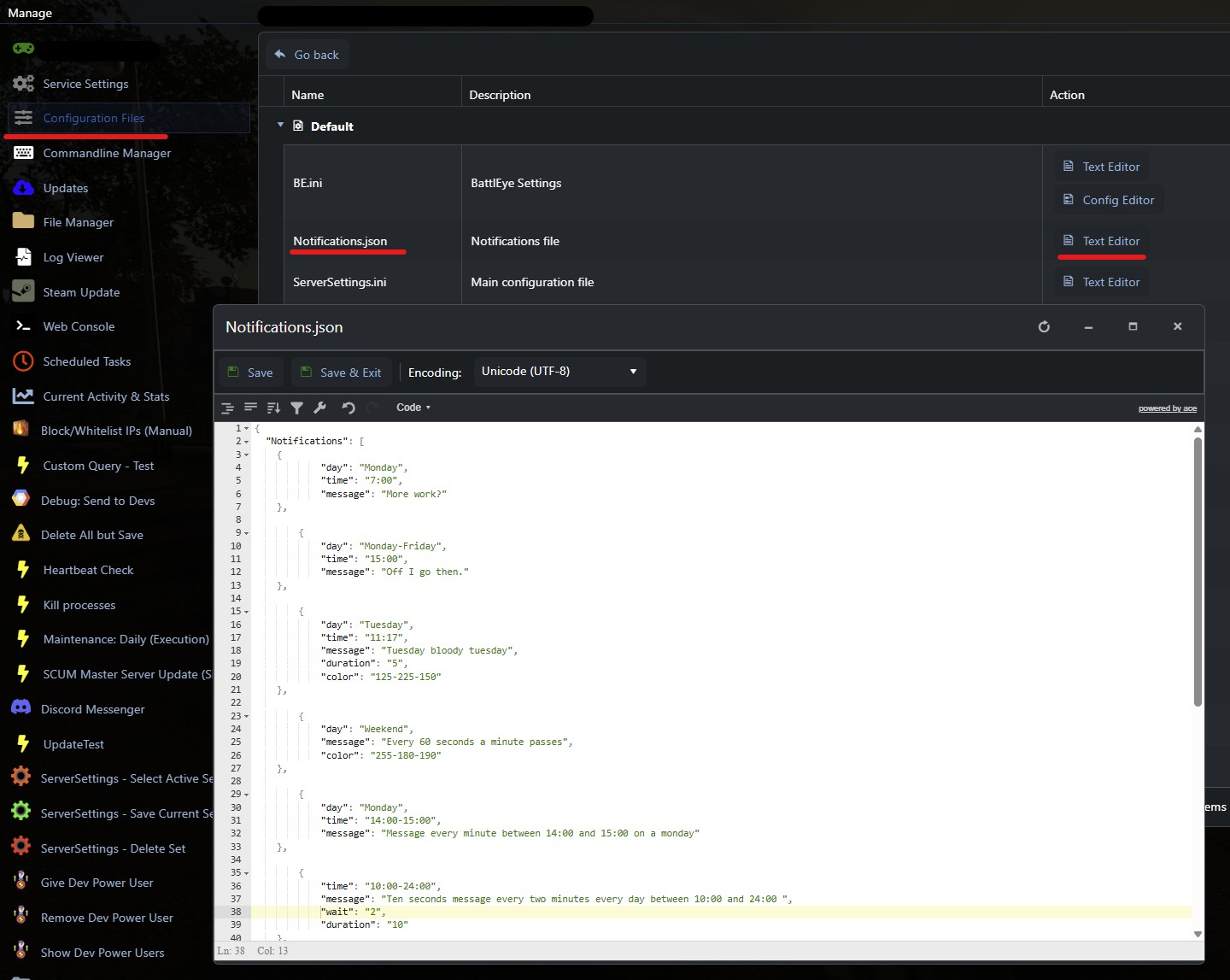
The Notifications.json can be accessed in the Configuration Files just like the other JSON and INI files:
File Structure
The file uses a section called "Notifications": [ ]. Each object inside this list is one scheduled notification.
{
  "day": "Monday",
  "time": "7:00",
  "message": "Good morning survivors!"
}
Available Keys
- day – When the message should appear.
- Single day: "Monday", "Tuesday", etc.
- Range: "Monday-Friday"
- Special: "Weekend", "Everyday"
- time – At what time(s) the message is shown.
- Single: "7:00"
- Multiple: ["15:12", "11:14"]
- Range: "14:00-15:00" → repeats every minute in that window
- duration – How long the message stays visible (in seconds).
Example: "duration": "10" - color – The text color in RGB format (R-G-B).
Example: "255-0-0" = red - wait – Interval (in minutes) between repeats inside a time window.
Example: "wait": "2" - message – The text players see. You can include placeholders (see below).
Placeholders
You can add these into your message text:
- #NumPlayers → shows number of players online
- #Date → current server date
- #Time → current server time (displayed on screen in UTC)
These two cannot be combined with other placeholders or message text. - #RestartIn(HH:MM) → countdown to restart
- #RestartAt(HH:MM) → restart notice at specific time (displayed on screen in UTC)
Example Notifications.json
{
  "Notifications": [
    {
      "day": "Everyday",
      "time": ["15:12", "11:14"],
      "message": "There are currently #NumPlayers players online"
    },
    {
      "day": "Tuesday",
      "time": "11:17",
      "duration": "5",
      "color": "125-225-150",
      "message": "Tuesday reminder with a greenish color"
    },
    {
      "day": "Weekend",
      "color": "255-180-190",
      "message": "This weekend message is shown in pink"
    },
    {
      "day": "Monday",
      "time": "14:00-15:00",
      "message": "Message every minute between 14:00 and 15:00 on a Monday"
    },
    {
      "time": "10:00-24:00",
      "wait": "2",
      "duration": "10",
      "message": "Reminder shown every 2 minutes between 10:00 and midnight"
    },
    {
      "message": "Right now is #Date #Time"
    },
    {
      "time": ["11:55-12:00"],
      "message": "#RestartIn(12:00)"
    },
    {
      "message": "#RestartAt(12:23)"
    }
  ]
}
Example Official Server Notifications.json
Below are the notification settings for official servers. These notifications will remind players of upcoming restarts. 1 hour before restart. Every 15 minutes after that, until 5 minutes remain. During the last 5 minutes, notifications appear every minute:
{
  "Notifications": [
    {
      "time": [
        "3:00",
        "3:15",
        "3:30",
        "3:45",
        "3:55-4:00"
      ],
      "color": "255-180-50",
      "message": "#RestartIn(4:00)"
    },
    {
      "time": [
        "9:00",
        "9:15",
        "9:30",
        "9:45",
        "9:55-10:00"
      ],
      "color": "255-180-50",
      "message": "#RestartIn(10:00)"
    },
    {
      "time": [
        "15:00",
        "15:15",
        "15:30",
        "15:45",
        "15:55-16:00"
      ],
      "color": "255-180-50",
      "message": "#RestartIn(16:00)"
    },
    {
      "time": [
        "21:00",
        "21:15",
        "21:30",
        "21:45",
        "21:55-22:00"
      ],
      "color": "255-180-50",
      "message": "#RestartIn(22:00)"
    }
  ]
}
Tips
- Always make sure your JSON syntax is valid and that the desired local time has been correctly converted to UTC, as all GG Host servers use UTC time.
- Test with a simple message before adding multiple entries.
- Use placeholders to keep your messages dynamic and useful.
Need a SCUM server?
GG Host is the official SCUM hosting provider, offering high performance, low latency servers and reliable support so your community can explore, survive, and dominate the island. Order your SCUM server now: https://www.gghost.games/store/scum-server
