


Your Deadside console server loads mods in the order shown in the Installed mods strip on the Mods page (service menu, Mod.io). This guide covers changing that order. New to mods? Start with installing mods.
Changing the order
Two ways, same result:
Drag: grab a mod card in the Installed mods strip and drag it to a new position.
Arrows: use the ← and → buttons on each card. This is the easier route on a touchscreen or with a keyboard.
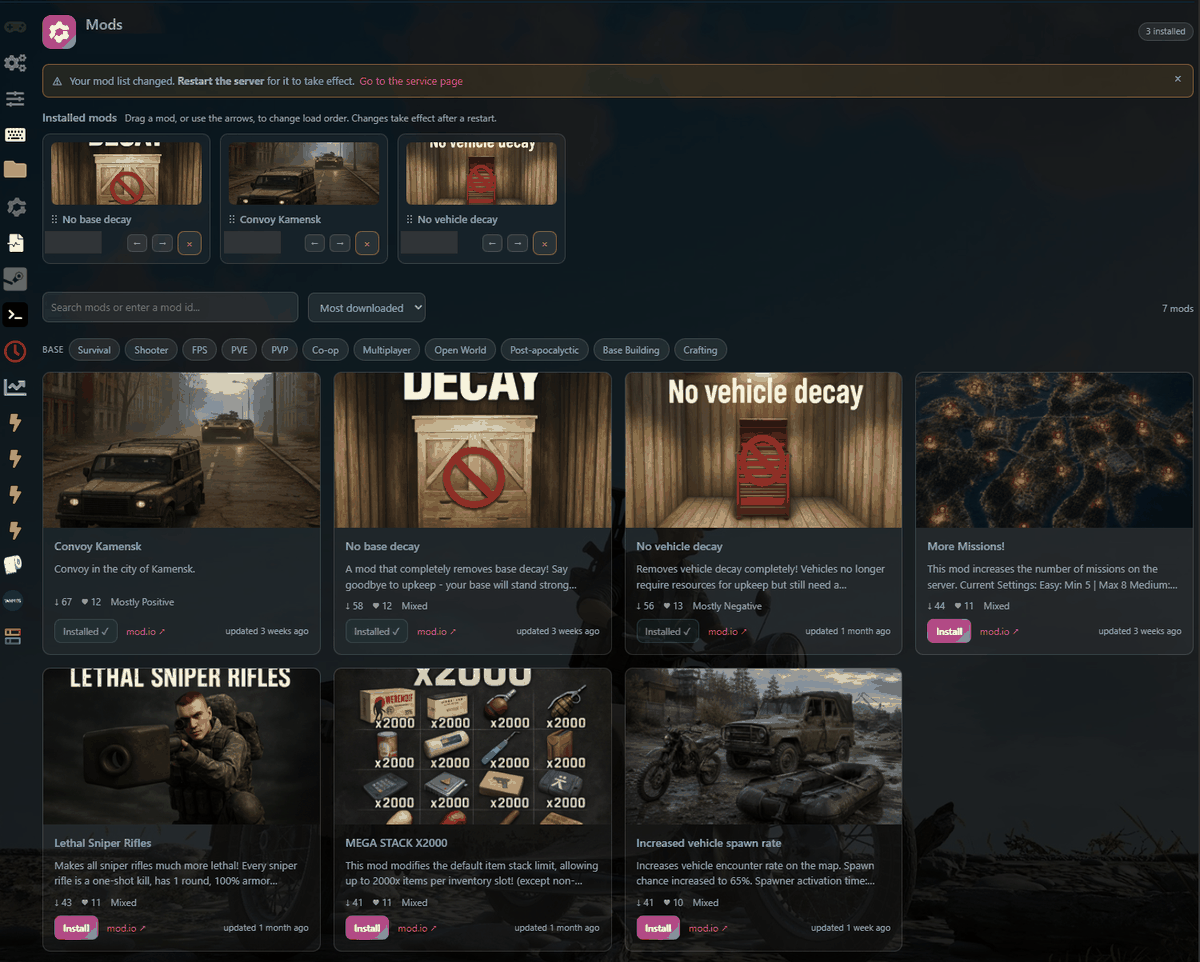
Apply the change
As the page itself puts it: changes take effect after a restart. Reorder your mods, then restart the server from your service page. Until you restart, the server keeps running the previous order.
When does order matter?
Often it doesn't: mods that touch completely different parts of the game coexist happily in any order. It starts to matter when two mods change the same thing. If a combination behaves oddly, reordering is the first cheap experiment: move one mod, restart, retest. The second cheap experiment is removing one of the two, restarting, and confirming which mod is responsible.
Good to know
The order (like the mod list itself) is stored in the GG Host panel, so it survives game updates and reinstalls. There's no separate save button: what you see in the strip is what the server will load next restart.
GG Host is an official Deadside hosting partner, offering high-performance, low-latency servers and reliable support for your community. Order your Deadside server now: https://www.gghost.games/store/deadside
